Welcome: Difference between revisions
imported>Achenar No edit summary |
mNo edit summary |
||
| (73 intermediate revisions by 6 users not shown) | |||
| Line 1: | Line 1: | ||
__NOTOC__ | __NOTOC__ | ||
= | = Renoise & Redux User Manual = | ||
Welcome to the interactive user manual for Renoise and its plugin sibling, Redux. These audio applications provide features for performing a wide variety of tasks in music and sound creation, and this manual will help you to understand how everything works in detail. You can use the column to the left to look through the list of topics or use the search function at the top-right to find something specific. If you're a complete beginner, it's recommended to start with the [[Introduction To Renoise]] and [[Introduction To Redux]] sections. | |||
If you have any questions or suggestions, then please don't hesitate to [mailto:support@renoise.com contact us.] | |||
== Video Tutorials == | |||
= | If you prefer to learn by video then take a look at [http://www.youtube.com/Renoise our Youtube channel,] which features videos on numerous topics for all skill levels, including a [https://www.youtube.com/playlist?list=PLB7op_Ds1S5zE3Jk6EgK31qVfhaa76YkW tutorial series for complete beginners.] | ||
If you prefer to | The Beginner's Tutorial provides a step by step guide to creating a song from scratch and is perfect for those new to Renoise or computer composing in general. If you'd prefer to download it instead of watching online, you can grab the videos here: | ||
* [http://files.renoise.com/videos/Renoise%203.0%20-%20Getting%20Started.mp4 Beginners Tutorial Part 1 - Getting Started] | |||
* [http://files.renoise.com/videos/Renoise%203.0%20-%20Building%20A%20Beat.mp4 Beginners Tutorial Part 2 - Building A Beat] | |||
* [http://files.renoise.com/videos/Renoise%203.0%20-%20Track%20Effects.mp4 Beginners Tutorial Part 3 - Track Effects] | |||
* [http://files.renoise.com/videos/Renoise%203.0%20-%20Automation.mp4 Beginners Tutorial Part 4 - Automation] | |||
* [http://files.renoise.com/videos/Renoise%203.0%20-%20Sequencing.mp4 Beginners Tutorial Part 5 - Sequencing] | |||
== Quickstart Guides == | |||
Alternatively, you can check out the Quickstart Guides for [http://files.renoise.com/manual/Redux%20Quickstart.pdf Redux] and [http://files.renoise.com/manual/Renoise%20Quickstart.pdf Renoise.] These PDF guides briefly explain the main concepts of Redux/Renoise and are recommended for those who are already familiar with other music applications. | |||
=== | === Effect Commands Quick Reference Card === | ||
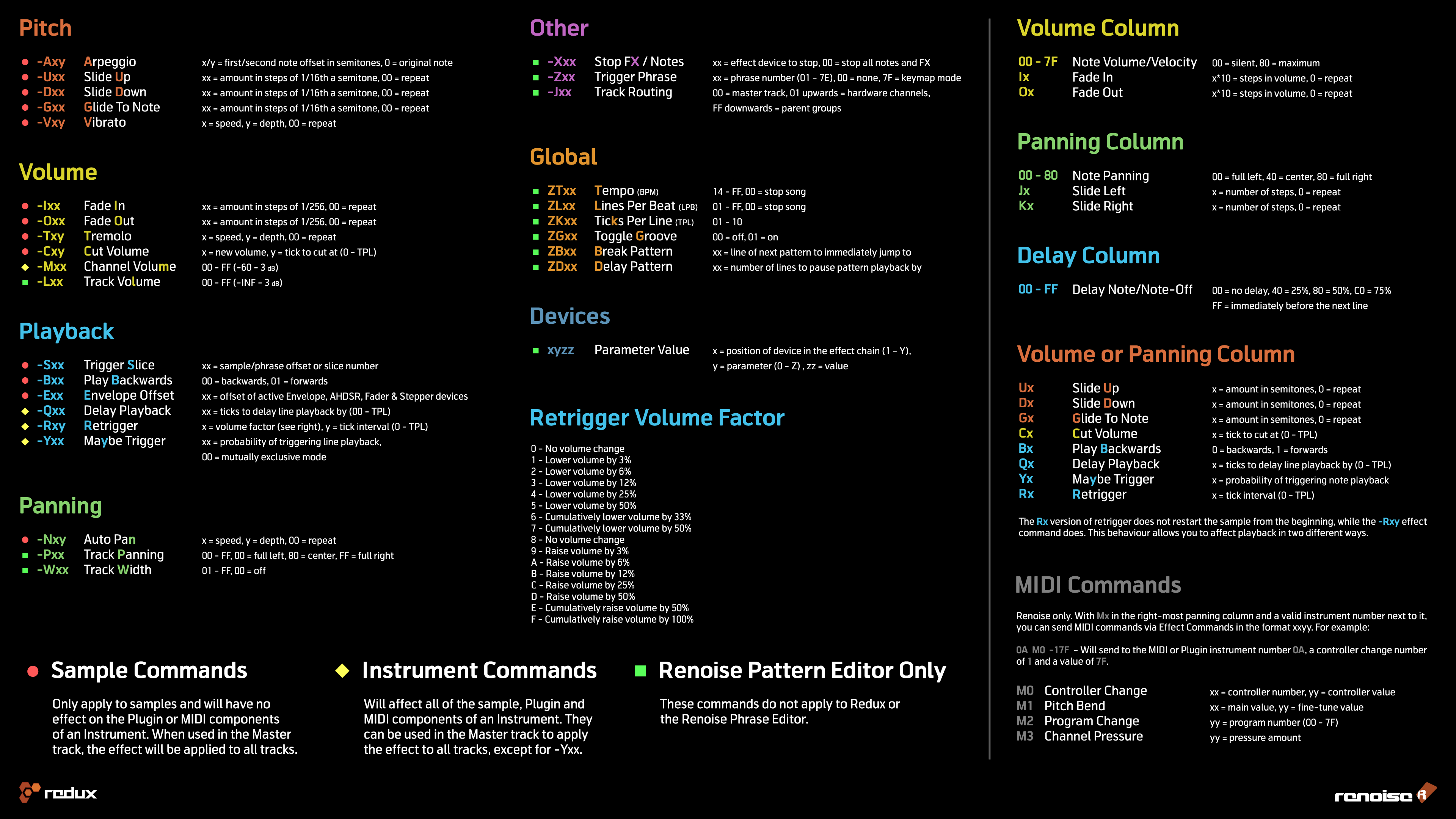
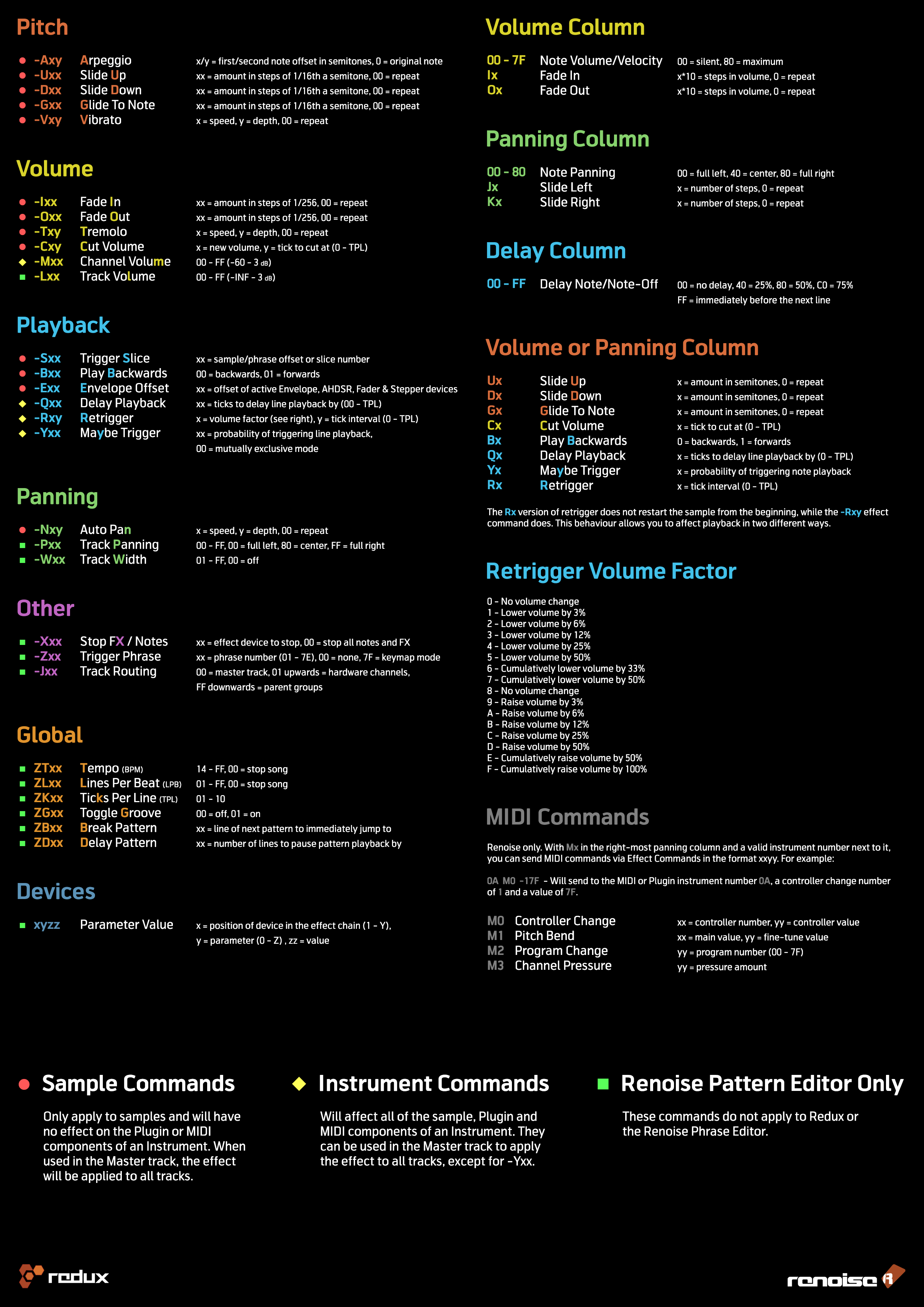
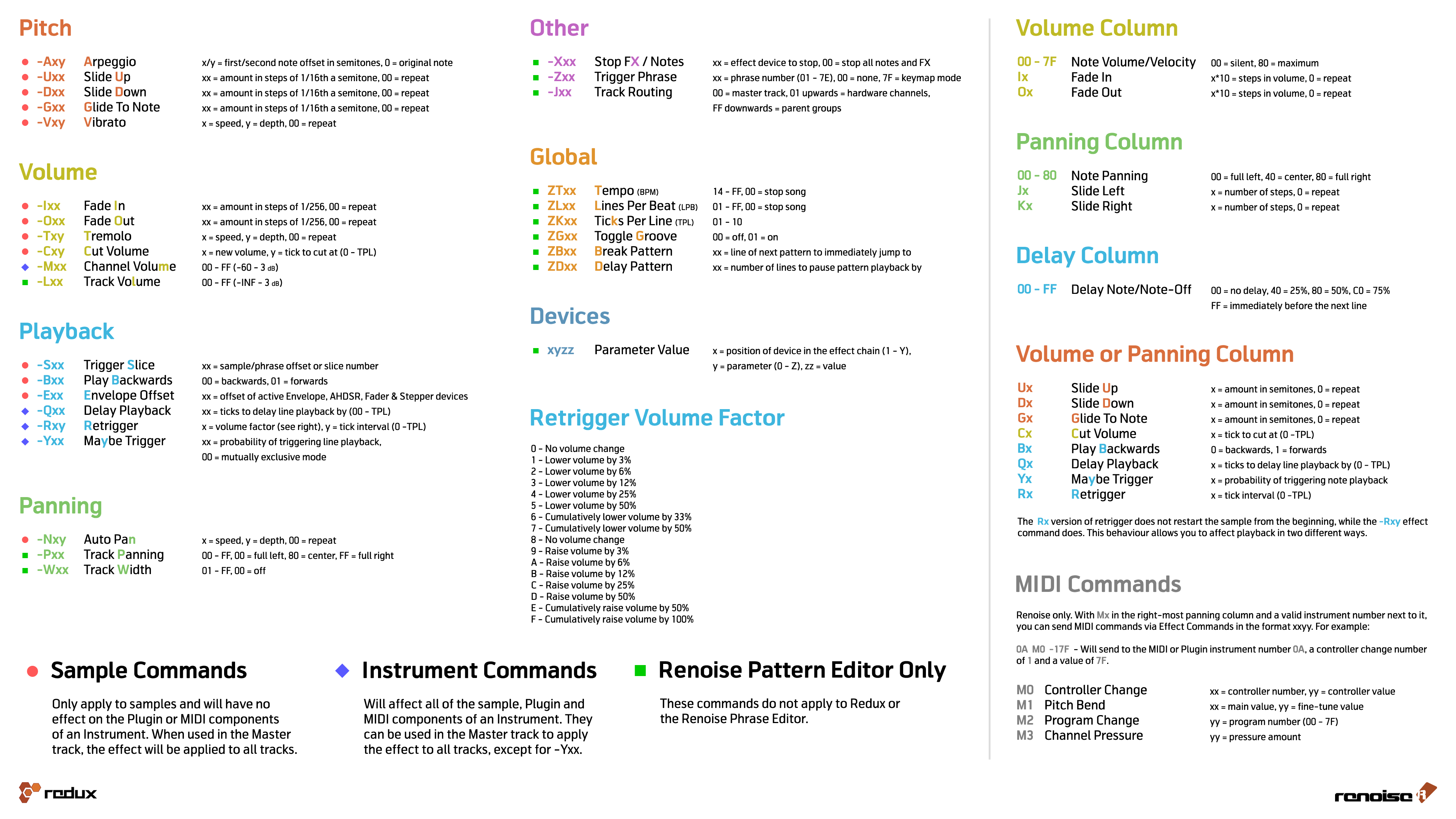
If you are familiar with Renoise/Redux already but need a quick overview of all [[Effect Commands]], check out the Effect Commands Reference Card, available in four different versions: | |||
* [https://tutorials.renoise.com/images/5/56/Effect_Commands_16-9.png Screen 16:9] | |||
* [https://tutorials.renoise.com/images/d/d0/Effect_Commands_A4.png Screen A4] | |||
* [https://tutorials.renoise.com/images/1/1f/Effect_Commands_16-9_print.png Print 16:9] | |||
* [https://tutorials.renoise.com/images/0/00/Effect_Commands_A4_print.png Print A4] | |||
<hr> | |||
<small>Copyright © 2023 by the Renoise authors. All rights reserved. All other product and company names are registered trademarks of their respective owners.</small> | |||
<small>The Renoise User Manual was created by Duncan Hemingway [Achenar], Vincent Voois [vV], Sato Takashi [sato], Dac Chartrand [Conner_BW], Eduard Müller [taktik] and Erik Jälevik [sharevari].</small> | |||
[[Impressum]] | [https://www.renoise.com/datenschutz Datenschutz] | |||
Latest revision as of 18:16, 8 July 2025
Renoise & Redux User Manual
Welcome to the interactive user manual for Renoise and its plugin sibling, Redux. These audio applications provide features for performing a wide variety of tasks in music and sound creation, and this manual will help you to understand how everything works in detail. You can use the column to the left to look through the list of topics or use the search function at the top-right to find something specific. If you're a complete beginner, it's recommended to start with the Introduction To Renoise and Introduction To Redux sections.
If you have any questions or suggestions, then please don't hesitate to contact us.
Video Tutorials
If you prefer to learn by video then take a look at our Youtube channel, which features videos on numerous topics for all skill levels, including a tutorial series for complete beginners.
The Beginner's Tutorial provides a step by step guide to creating a song from scratch and is perfect for those new to Renoise or computer composing in general. If you'd prefer to download it instead of watching online, you can grab the videos here:
- Beginners Tutorial Part 1 - Getting Started
- Beginners Tutorial Part 2 - Building A Beat
- Beginners Tutorial Part 3 - Track Effects
- Beginners Tutorial Part 4 - Automation
- Beginners Tutorial Part 5 - Sequencing
Quickstart Guides
Alternatively, you can check out the Quickstart Guides for Redux and Renoise. These PDF guides briefly explain the main concepts of Redux/Renoise and are recommended for those who are already familiar with other music applications.
Effect Commands Quick Reference Card
If you are familiar with Renoise/Redux already but need a quick overview of all Effect Commands, check out the Effect Commands Reference Card, available in four different versions:

Copyright © 2023 by the Renoise authors. All rights reserved. All other product and company names are registered trademarks of their respective owners. The Renoise User Manual was created by Duncan Hemingway [Achenar], Vincent Voois [vV], Sato Takashi [sato], Dac Chartrand [Conner_BW], Eduard Müller [taktik] and Erik Jälevik [sharevari].